
Divi Lead Ledger · For Divi 4, Divi 5 and Contact Form 7
Capture every lead your Divi forms bring in
Save every submission, score it with AI, and follow up automatically, day or night.
Divi makes it easy to build beautiful contact forms. Lead Ledger makes every submission count. Each lead is saved to your WordPress database, answered automatically and tracked through to a reply.
AI is included. Turn it on with one click to score every lead and write personal replies, using your own OpenAI or Anthropic key.
New: Lead Guardian
Guardian checks your forms every hour, saves a copy of filtered submissions for you to review, and lets you know right away if anything needs attention.
$59 per year. Unlimited sites, 1 year of updates and support, sold through the Divi Marketplace.
Screenshots show demo data.
See Lead Ledger in action
Divi builds the form. Lead Ledger works the lead.
Lead Ledger plugs straight into the Divi Contact Form module you already use. Your forms, your design and your notification emails stay exactly as they are. Lead Ledger adds what comes next: a home for every lead, fast follow-up, and a dashboard that shows which pages bring in business.
Every feature is included in one purchase. No tiers, no add-ons.
Contact Form 7 works too
Using Contact Form 7 forms, on their own or styled with the Divi 5 Contact Form 7 module? Switch on Contact Form 7 support in Settings and those submissions are saved, scored, answered and sent to your webhook just like your Divi forms, with a Form type label so you always know where each lead came from.
Lead Guardian watches them too. It flags a form with no recipient, form setup errors, demo mode left on and failed notifications, and keeps a copy of anything marked as spam.
Every lead saved, searchable and ready to work
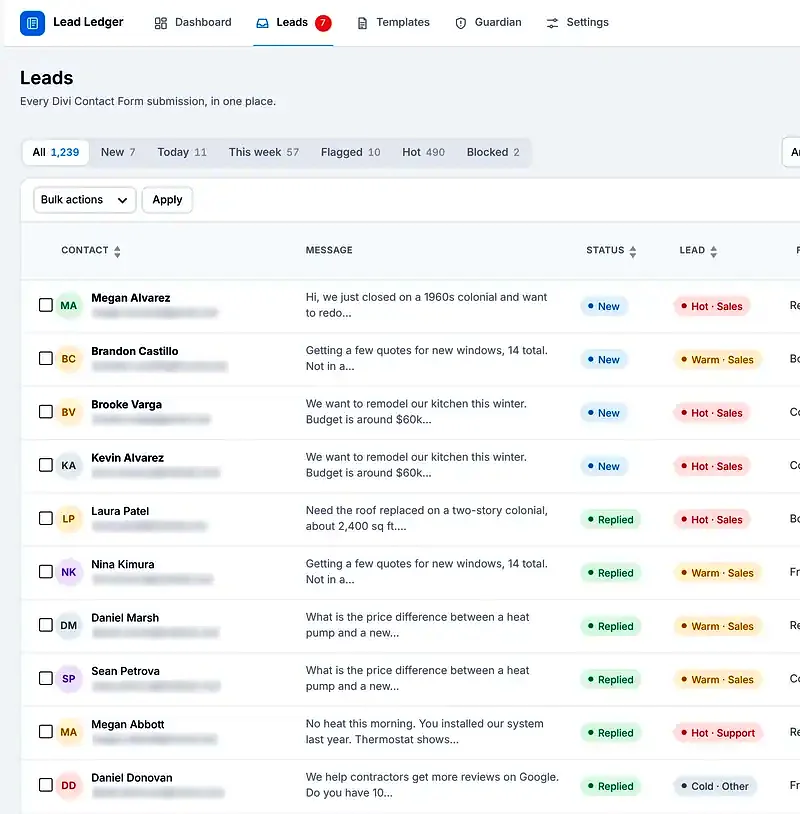
The moment a visitor submits a form, Lead Ledger saves it as its own record in your WordPress database. Every inquiry you've received is one click away, and the history belongs to you.
- Search, filter and sort every lead from one screen
- See which page and form each lead came from
- Track each lead from new to replied, so nothing slips
- Export to CSV for your CRM or spreadsheet any time
Follow up in seconds, right out of the box
The business that answers first usually gets the job. Lead Ledger can send a branded reply the instant someone submits a form, built from your own template with merge tags like their name. It works the day you install it, no AI required.
- Instant automatic replies from your own templates
- Personal replies from the lead screen, with a preview before anything is sent
- Follow-up drafts that pick up where your last reply left off
- A daily digest of new leads and who is still waiting on you
- Webhooks that pass new leads to the tools you already use

AI included · Turn on with one click
Add AI and give every lead a head start
Every Lead Ledger license includes the AI features. Turn them on with one click in Settings, add your own OpenAI or Anthropic key, and Lead Ledger reads each lead the way a sharp sales assistant would.
You decide when AI runs, you preview manual replies before they go out, and you pay your AI provider directly for what you use.
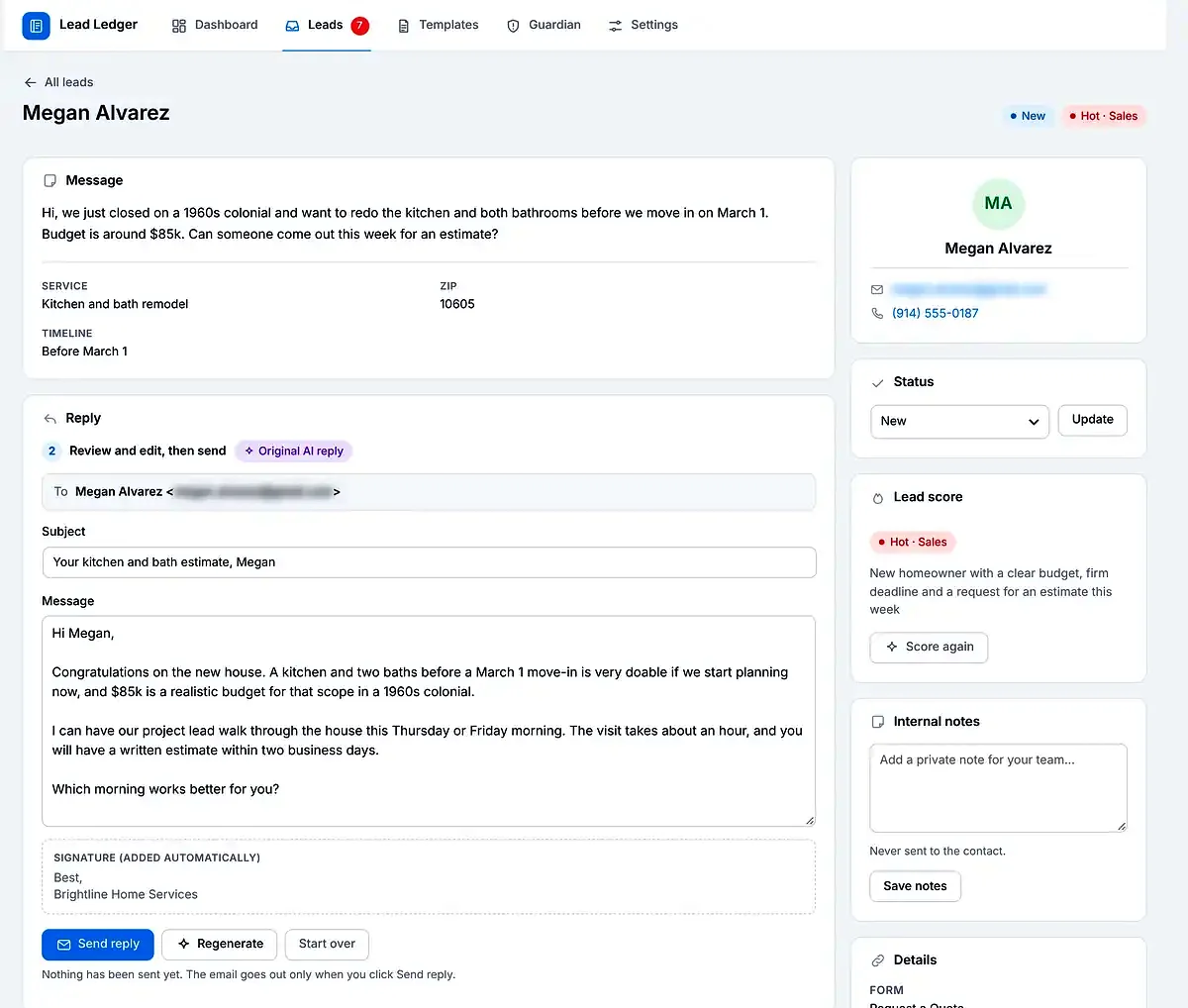
Know who is ready to buy
Every lead gets an AI score and intent, so your hottest prospects rise to the top before you open a single message.
Answer personally at 2 a.m.
Automatic replies written for each person and their question, sent the moment the form comes in, day or night.
Sound like you, every time
AI polish keeps your template's wording and tailors it to each lead, so every reply sounds like your business and fits the person reading it.
Keep conversations moving
Follow-up drafts read your earlier reply and move things forward with one helpful point and a clear next step.
AI lead scoring
Know which leads to call first
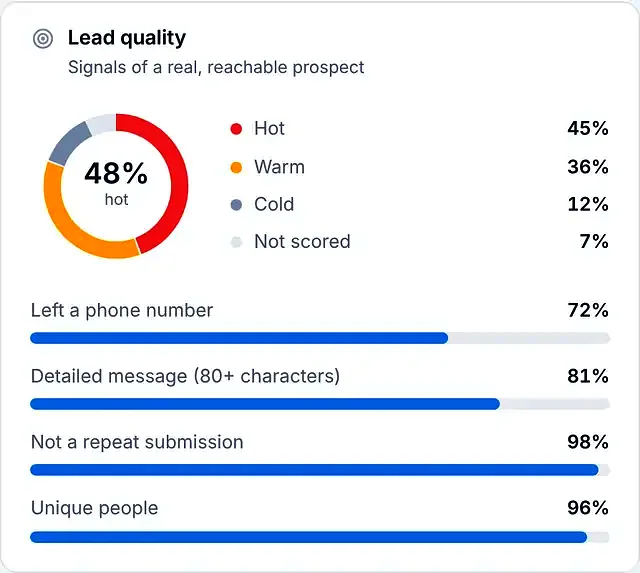
Turn on AI lead scoring and every new submission is read and labeled the moment it arrives. Each lead gets a score, an intent and a one-line reason, so you can see at a glance who is ready to buy.
- Hot, Warm or Cold, based on what the person actually wrote
- Sales, Support or Other, so service requests never bury new business
- A plain-English reason behind every score
- Filter your inbox to Hot leads in one click
- Hot leads today, right on your dashboard
- Score any lead again with one click
Hot · Sales
Megan Alvarez · Request a Quote
“We just closed on a 1960s colonial and want to redo the kitchen and both bathrooms before March 1. Budget is around $85k. Can someone come out this week?”
Why: clear budget, firm deadline and a request for an estimate this week.
Warm · Sales
Brandon Castillo · Contact Us
“Getting a few quotes for new windows, 14 total. Not in a rush, but we would like it done in the spring.”
Why: interested and comparing quotes, with a flexible timeline.
Cold · Other
Derek Donovan · Free Consultation
“We help contractors get more reviews on Google. Do you have 10 minutes for a quick call this week?”
Why: vendor pitch, not a customer.
Hot
Ready to buy now, with a clear need, budget or deadline. Call these first.
Warm
Interested and comparing options. Follow up the same day while you are still top of mind.
Cold
General questions, vendor pitches and job seekers. Handle them when you have time.
Included with every license. Lead scoring uses the built-in AI features. Turn it on with one click and add your own OpenAI or Anthropic key.
Webhooks
Send every lead to the tools you already use
Paste one URL into Settings and Lead Ledger sends each new lead the moment it arrives: name, email, phone, message, every custom field, the form and page it came from, plus its AI score and intent.
- Add leads to your CRM, like HubSpot or Pipedrive, through Zapier, Make or n8n
- Log every submission to a Google Sheet automatically
- Alert your team in Slack the moment a Hot lead comes in
- Start an email or text message follow-up sequence
- Feed your own app or reporting dashboard
It runs in the background, so your forms stay fast, and any delivery problem is shown in Settings.
What your webhook receives
{
"name": "Megan Alvarez",
"phone": "(914) 555-0187",
"message": "We just closed on a 1960s colonial…",
"extra_fields": { "service": "Kitchen and bath remodel" },
"form_name": "Request a Quote",
"page_url": "https://example.com/request-a-quote",
"lead_score": "hot",
"lead_intent": "sales",
"is_duplicate": false
}
Send new leads to any tool that accepts a webhook, directly or through Zapier, Make or n8n:
HubSpot
Pipedrive
Google Sheets
Slack
Mailchimp
Your own app
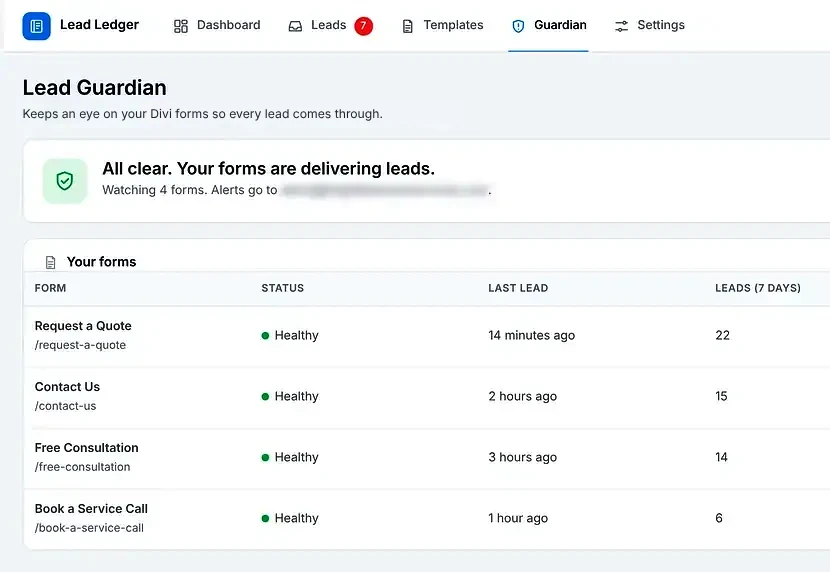
Lead Guardian keeps every form delivering
Your forms are your front door, so Lead Guardian checks on them every hour. If anything needs attention, you get a clear note with the steps to take, by email and in your dashboard.
- Saves a copy of filtered submissions, ready to add as a lead in one click
- Confirms each form's spam protection is fully connected
- Notices when a busy form is quieter than usual
- Watches WordPress email so your notifications keep arriving
New · Returning-lead alerts
Know the moment a past lead comes back
Someone who filled out your form last month is back and reading your pricing page. That's the best time to reach out. Turn on returning-lead alerts and Lead Ledger emails you while they're still on your site.
- One email per visit, with a cooldown you control
- Limit alerts to the pages that matter, like Pricing or Services
- Every return visit and page viewed on the lead's timeline
- Works with Divi forms and Contact Form 7
Optional and consent-based. Off by default. It works with your cookie banner (WP Consent API) or a form checkbox, honors Global Privacy Control, and includes an opt-out shortcode and privacy policy text.
Example alert email
Jane Smith (lead from Oct 12) is on your Pricing page right now.
Sent while she's still browsing, so you can call or reply while you're on her mind.
The lead's timeline shows each return visit and the pages viewed, with an "On site now" badge while they're browsing.
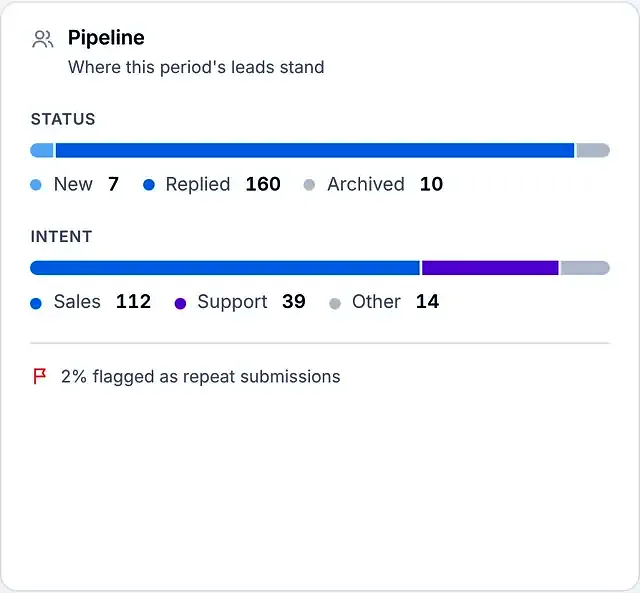
See which pages bring in business
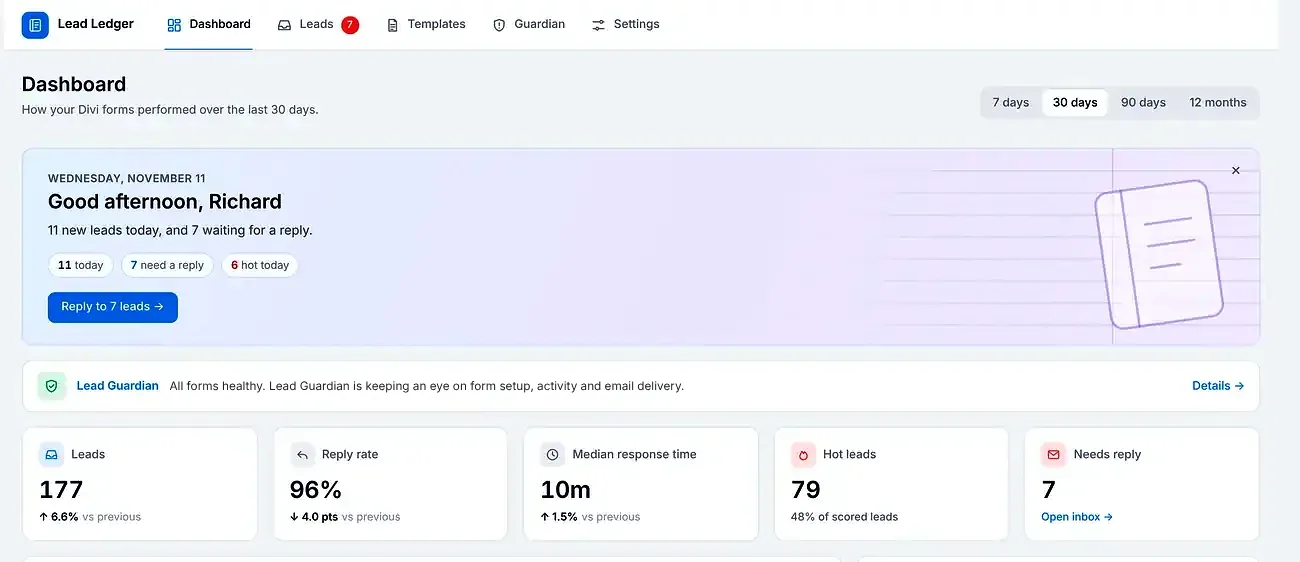
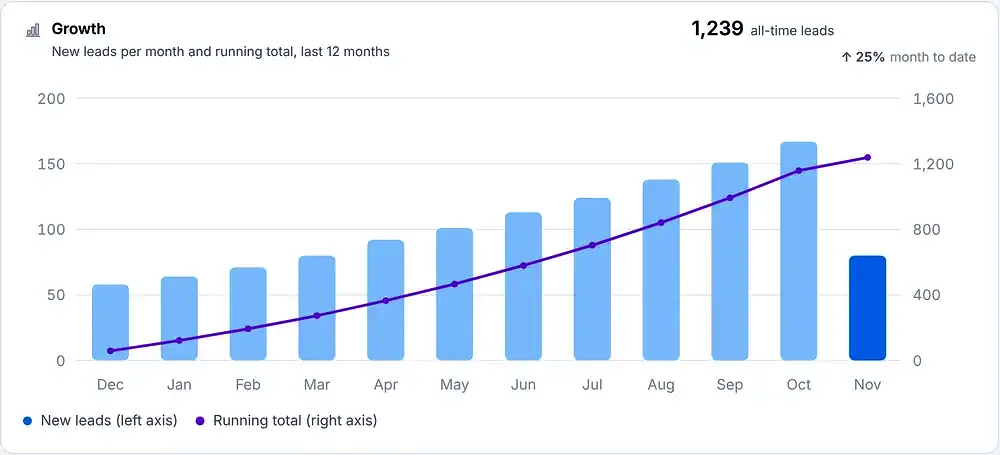
The Lead Ledger dashboard turns your form submissions into a clear picture of what's working, so you can put more into the pages that perform.
- Lead trends against the previous period, plus 12-month growth
- Your top-performing forms and pages
- Median time to first reply, so you can watch your response time improve
- A weekday and hour heatmap of when leads arrive
- A daily greeting with today's numbers and the leads waiting on you
How it works
Up and running in minutes
01
Install from the Marketplace
Purchase on the Divi Marketplace and install it like any plugin. Updates arrive through your Elegant Themes account, with no separate license key to manage.
02
Keep the forms you love
Every Divi Contact Form on your site is captured automatically, and Contact Form 7 forms are one switch away. Nothing to rebuild, and visitors see the same forms they always have.
03
Turn on what you want
Set up your reply templates, switch on automatic replies, and add an AI key whenever you're ready. Lead Guardian starts watching right away.
Questions
Does it work with Divi 5?
Yes. Lead Ledger works with the Contact Form module in Divi 4 and Divi 5, including forms built in the Divi 5 Visual Builder.
Does it work with Contact Form 7?
Yes. Turn on Contact Form 7 support in Settings and Lead Ledger captures your Contact Form 7 submissions alongside your Divi forms, including forms placed with the Divi 5 Contact Form 7 module. You can filter your leads by form type, and Lead Guardian checks your Contact Form 7 forms for missing recipients, setup errors, demo mode and failed notifications. It is off by default, so Divi-only sites are not affected.
Does returning-lead tracking respect privacy?
Yes. Returning-lead alerts are off by default and only work with the visitor's consent, given through your cookie banner (via the WP Consent API) or a checkbox on your form. Visitors whose browser sends Global Privacy Control are never tracked, logged-in staff are skipped, and the cookie is first-party only. A shortcode gives visitors an opt-out button, and suggested privacy policy text is included.
Do I need to change my forms?
No. Install and activate it, and your existing forms are captured automatically.
Is AI included? Do I have to use it?
AI is included with every license, and using it is up to you. Lead storage, automatic replies from your templates, follow-ups, the dashboard and Lead Guardian all work without it. When you are ready, turn on AI lead scoring and AI-written replies with one click and add your own OpenAI or Anthropic key.
Can I send leads to my CRM or other tools?
Yes. Add a webhook URL in Settings and every new lead is sent as JSON the moment it arrives, including custom fields, the source form and page, and its AI score and intent. Connect it directly to your own system, or use Zapier, Make or n8n to reach HubSpot, Pipedrive, Google Sheets, Slack and thousands of other apps.
How does licensing work?
Lead Ledger is sold through the Divi Marketplace. One purchase covers unlimited sites with 1 year of updates and support. Updates are delivered through your Elegant Themes username and API key, entered under Divi, Theme Options, Updates.
Where is my lead data stored?
In your own WordPress database. IP address storage is optional, and the plugin includes WordPress privacy export and erase support plus automatic cleanup after a retention period you choose.
How is it different from Divi Contact Vault?
Divi Contact Vault is sold directly with free and Pro plans. Lead Ledger is the Divi Marketplace edition: every feature is included, and it adds Lead Guardian.
Get more from every Divi form you build
Save every lead, reply in seconds, and switch on AI with one click. $59 per year for unlimited sites, with 1 year of updates and support.